What the program is
Bindery (bindery.jonaddams.com) is a document application operated by Jon Addams. It can send you a text message when something happens to a document you already have access to — most commonly when a colleague mentions you in a comment, and in future when document processing you started has finished.
Text notifications are off by default. Nothing is ever sent to a number until that number has texted us first.
How to opt in
Registration is deliberately inbound: you send us a message, we never send one to an unconfirmed number.
- Sign in to bindery.jonaddams.com. Bindery is an internal application, so sign-in is limited to
nutrient.ioandpspdfkit.comaccounts — a personal Google account is refused. The opt-in screen is reproduced below, and support@jonaddams.com will walk anyone who needs to verify it through the flow directly. - Open Settings → Notifications. A short, single-use code is displayed there, along with the number to send it to.
- From the mobile number you want to register, text that code to +1 269 292-5337.
- We match the code to your account and reply once to confirm. That inbound message is the record of your consent; we store the number, the message and the time it arrived.
You are never asked to type a phone number into a form, so a number cannot be registered by anyone other than the person holding the handset.
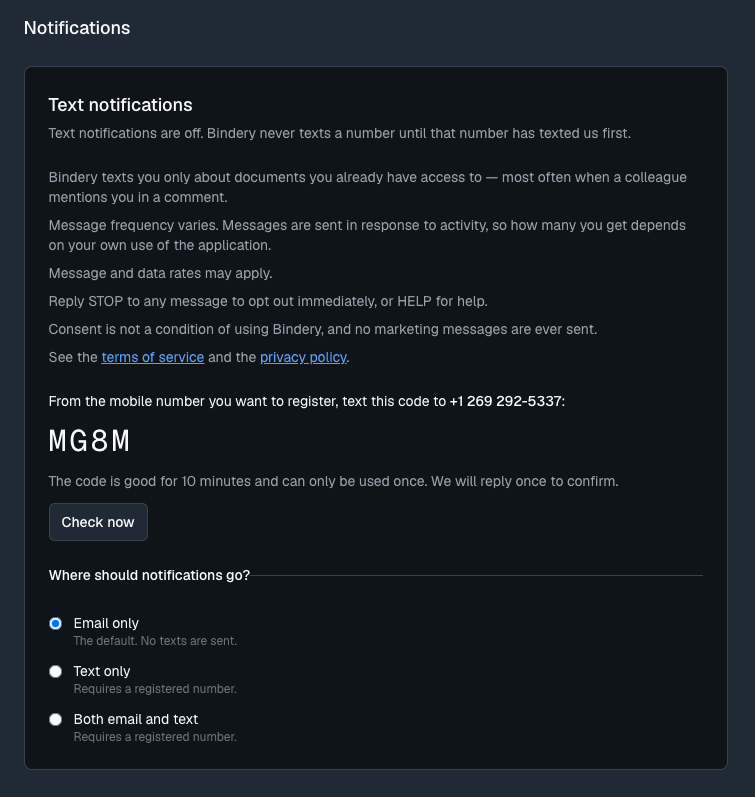
What the opt-in screen shows. Under Settings → Notifications, Bindery states that text notifications are off and that it never texts a number until that number has texted first. Alongside the opt-in control it repeats every disclosure on this page — what the messages are, how often they come, that message and data rates may apply, that STOP opts out and HELP gets help, and that consent is not a condition of use — and links the terms of service and the privacy policy. Choosing Set up text notifications then names the number to text and shows a four-character single-use code beneath it, good for ten minutes and usable once. There is no field to type a phone number into.
Example messages
- When a colleague mentions you:
Bindery: Alice Example mentioned you on "Q3 Contract". Reply to add a comment. https://bindery.jonaddams.com/documents/abc123 Reply STOP to opt out. - Confirming your registration:
Bindery: You're registered. Get a text when someone mentions you. Msg frequency varies. Msg&data rates may apply. Reply HELP for help, STOP to cancel. - If you reply HELP:
Bindery: Mention notifications for your documents. Reply to a notification to comment. Msg & data rates may apply. Reply STOP to opt out. - If you text a code that is already used:
Bindery: Your number is already registered. Reply HELP for help, STOP to cancel.
Cost and frequency
The program is free to join. Message and data rates may apply. Message frequency varies. Messages are sent only in response to activity, so how many you receive depends on your own use of the application.
How to opt out or get help
- Reply STOP to any message. Messages end immediately and your number is deleted. Nothing further is sent unless you register again.
- Reply HELP to any message for a description of the program and how to reach support.
- Or email support@jonaddams.com.
No marketing messages are sent, and consent is never a condition of using the application.
See the privacy policy and the terms of service.